Back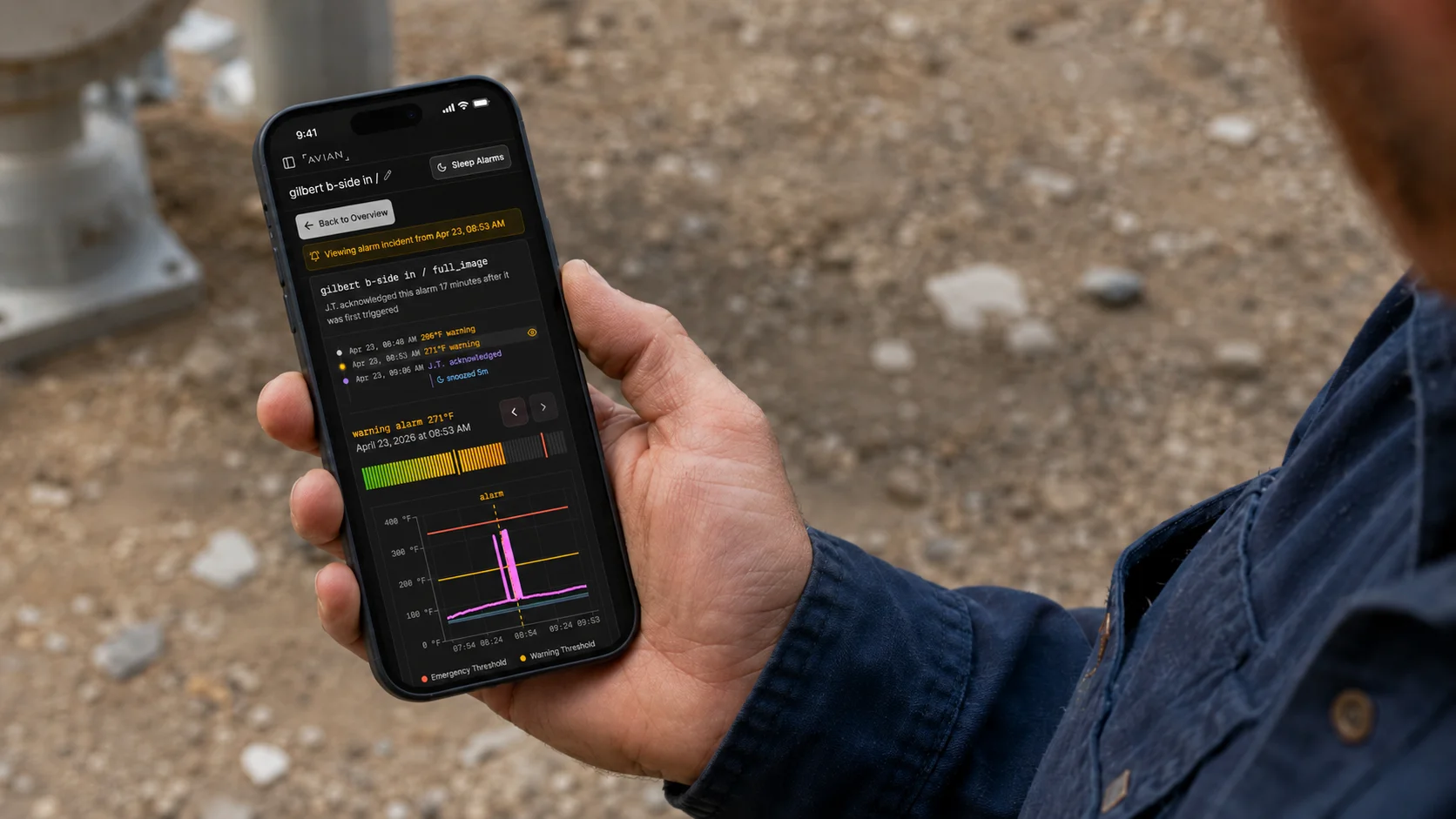
2026-05-14/Drew Hanover
Why Remote Thermal Monitoring Should Not Start as an Integration Project
Remote thermal monitoring should feel like a working system, not a parts list.
When a facility buys AVIAN, it is not buying a camera and then figuring out the software later. It is buying an all-in-one thermal monitoring system: the T100 camera, cloud dashboard, AI detection, alerting, event history, false alarm filtering, support, and optional plant integration in one package.
That matters because industrial teams do not usually have a thermal monitoring problem in isolation. They have a response problem. Someone needs to know what is overheating, see the live context, trust the alarm, acknowledge it, and decide what happens next.
Cloud connected remote monitoring is how AVIAN makes that workflow usable from the start.
The camera-only path creates a project
Industrial thermal cameras are powerful tools. FLIR, Optris, Fotric, and other imaging companies build serious hardware for teams that know exactly how they want to use thermal data.
That is a good fit when the buyer has controls engineers, IT support, reliability engineers, a VMS or SCADA layer, and an internal owner for the monitoring software.
It is a harder fit when the goal is simple: get reliable thermal coverage, route alarms to the right people, and let operators see what is happening from a phone or computer.
The camera-only path usually means someone still has to answer practical questions:
- Where should each camera go?
- Which zones or assets should be monitored?
- What temperature behavior is normal?
- Which alarms are real enough to wake someone up?
- How will remote users access the live view?
- Who receives alerts by shift, severity, and time of day?
- Where does event history live?
- Who keeps thresholds and false alarm filters tuned?
That work is not glamorous. It is the difference between having a thermal image and having a monitoring system.
What the integration work looks like
This is not theoretical. FLIR's own A-Series materials show the kind of expertise a camera-first deployment can require.
The A400/A500/A700 new user guide walks through power, Ethernet, IP settings, web-interface access, RTSP, MQTT, Modbus, SDK connections, MATLAB, NI MAX, and example architectures for early fire detection and condition monitoring.
FLIR's A-Series integration page describes two broad routes:
- Smart Sensor configurations, which expose measurement results and alarms through industrial protocols such as REST API, MQTT, Modbus TCP, EtherNet/IP, SMTP, FTP, digital outputs, and a web interface.
- Image Streaming configurations, which send radiometric thermal data to software through tools such as GigE Vision, GenICam, RTSP, Spinnaker SDK, and Atlas SDK.
Those are useful options for integrators. They are not the same as an out-of-the-box remote monitoring workflow for operators.
Protocols move data. They do not decide whether the planer mill superintendent, night-shift lead, maintenance manager, or on-call supervisor should receive the alarm. They do not automatically create event history, one-tap acknowledgement, live thermal and RGB context, adaptive baselines, or false alarm filtering.
That layer still has to exist.
AVIAN is the system, not an add-on
AVIAN is not software placed on top of third-party cameras.
AVIAN is a purpose-built thermal monitoring system. The camera, cloud platform, detection logic, alerting, support, and response workflow are designed together.
That changes the deployment experience.
Instead of starting with an IP camera configuration project, AVIAN starts with the monitored risk: the conveyor, planer, dust duct, pile, charger, motor, panel, or high-risk area your team cannot watch continuously.
From there, the system includes:
- AVIAN T100 thermal monitoring cameras
- Thermal and RGB visibility in one workflow
- Cloud dashboard access from phone, tablet, and browser
- Native mobile access for iPhone, Android, and iPad
- AI thermal anomaly detection
- Baseline-aware thresholds
- False alarm filtering for forklifts, welding, hot work, and routine process heat
- Alert routing through phone calls, SMS, WhatsApp, email, and app notifications
- Event history and acknowledgement tracking
- Optional PLC or control-system integration when the site needs automated response
That is why setup can be measured in minutes for a standard camera once power and network access are available. The system is already there. Your team is not starting from a sensor and building the rest.
Why this matters on the floor
The person who receives the alarm is usually not the person who configured the camera.
It might be an operator on the floor, a millwright on a catwalk, a superintendent in another part of the mill, or a manager at home after hours. They do not need to know the difference between MQTT and Modbus to respond correctly.
They need a clear alert. They need the live thermal view. They need visible context. They need to acknowledge the event and know whether someone else is already acting.
That is the product experience AVIAN is built around.
The goal is not to make a flexible engineering platform slightly easier to use. The goal is to give industrial teams a working monitoring system they can trust.
The practical difference
A camera-only approach can work well when a facility wants to build its own thermal monitoring stack.
AVIAN is for teams that want the stack already assembled.
The difference shows up quickly:
- Less custom configuration before the first useful alarm
- Less dependence on one controls or IT specialist to keep the system usable
- Faster access from phones, tablets, and browsers
- Alerts that reach people, not just systems
- Event records that support follow-up and maintenance decisions
- Detection logic tuned for industrial heat, false alarms, and real response workflows
That is the reason AVIAN feels different from traditional camera deployments. It is not a better way to bolt software onto a camera. It is a complete monitoring system built so the camera, cloud, AI, and response workflow work together from day one.
If your team wants remote thermal monitoring without turning it into an integration project, start with Cloud Connected Remote Monitoring or talk to AVIAN about what setup would look like in your facility.
Drew Hanover
CTO & Co-Founder
Sources
Get new AVIAN insights in your inbox
We'll send practical notes on industrial fire prevention, thermal monitoring, and customer learnings. No noise.